Skip to content

Founder pricing for the first 500

Know how much to save each month until move-in.

Down payment, closing costs, movers and home essentials in one plan, month by month. Chavinho tells you when a goal won’t make it in time, and family and friends can chip in with gift shares.

Build my free plan

Takes under a minute, no sign-up. Or just join the waitlist

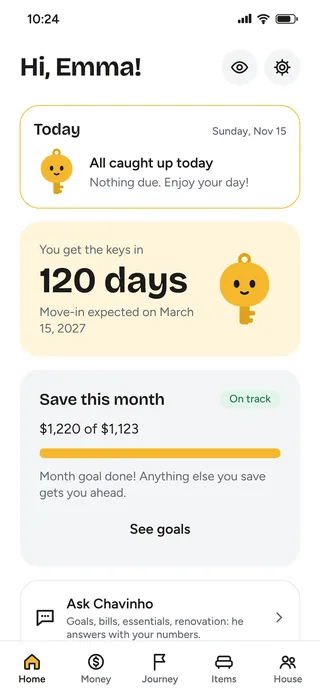
App home screen: the Today card is all caught up, and the countdown shows 120 days until move-in

For anyone who’s

  • saving for a down payment
  • waiting on a new build
  • closing on a home
  • about to rent
  • already holding the keys

A few quick questions. Chavinho builds your plan.

This is how the app starts. Takes under a minute.

Hi! I’m Chavinho. Want to build your plan? Where are you in the journey?

Home essentials

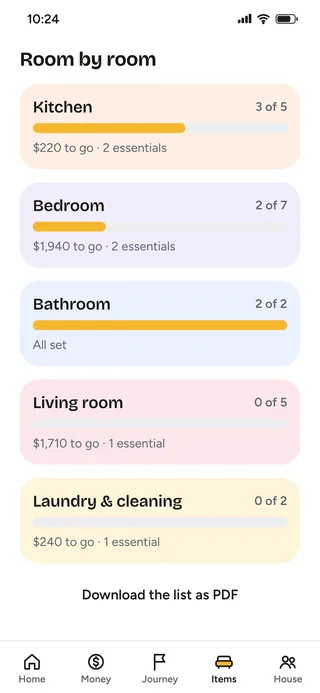
Your new home checklist, room by room.

Start with a ready-made list for the size of your place and who’s moving in. Check off what you buy and watch your home come together.

  • From first-night essentials to what can wait
  • Photo, price, quantity and a link from any store

Wish list

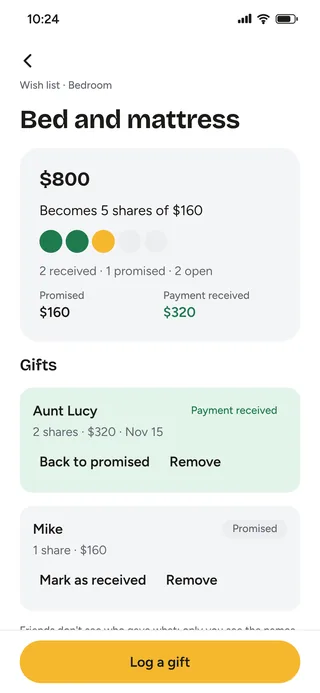
An $800 bed becomes 5 gifts of $160.

Share your list with friends. Each one picks a whole gift or a share, and the money goes straight to you through Venmo, Zelle or PayPal. No duplicate gifts.

  • One link to text to everyone
  • See who pledged and who already sent it

Money

Know if the money works out before move-in.

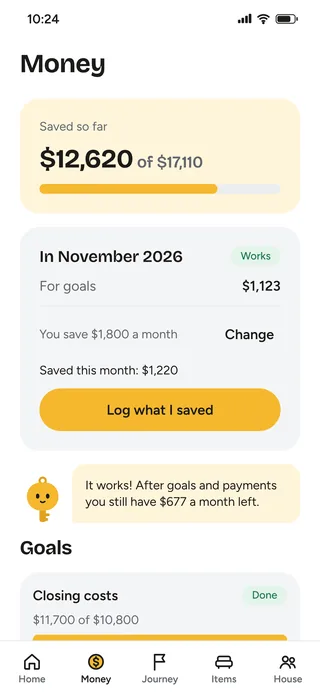
Down payment, closing costs, movers, home essentials. Chavinho works out how much to save each month and warns you when a goal won’t make it in time.

Journey

Every step at the right time.

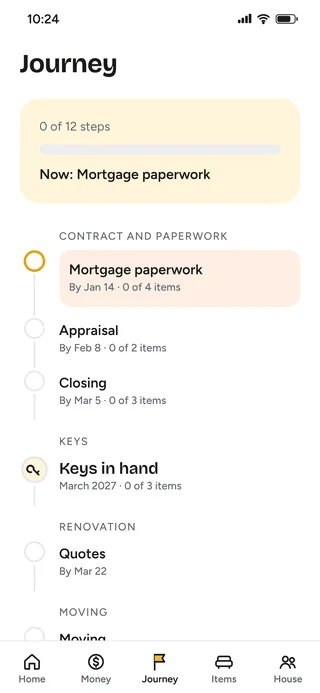
Mortgage paperwork, inspection, closing, moving day. The journey shows what’s next and reminds you when it’s time.

Tips help you get organized and don’t replace legal or financial advice.

Shared home

Made for living together.

Invite whoever’s moving in with you. You see the same list, the same goals and the same countdown, and everyone sees who paid, who bought what and whose turn it is.

One subscription covers the whole home.
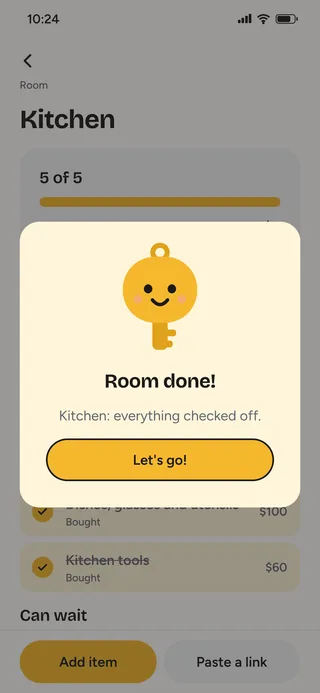
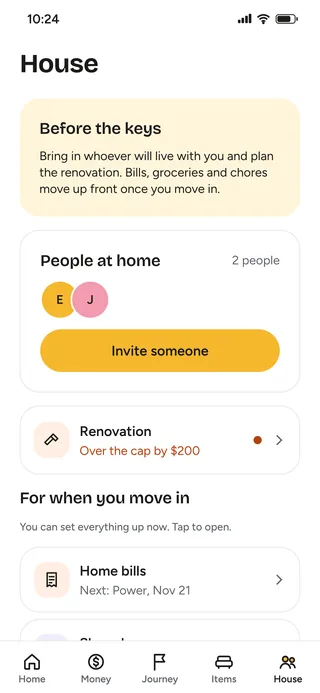
Home essentials room by room: Kitchen 3 of 5, Bedroom 2 of 7, Bathroom 2 of 2, Living room 0 of 5 and Laundry 0 of 2, each with what’s left to buyChavinho celebrates: Room done! Kitchen: everything checked off.An $800 bed and mattress on the wish list, in 5 shares of $160: 2 paid by Aunt Lucy and 1 pledged by MikeMoney screen: $12,620 saved of $17,110, $1,123 going to goals in November and a note that the plan worksJourney to move-in: now, mortgage paperwork; then appraisal, closing and keys in handHome tab before move-in: Emma and Jordan, the Invite someone button and the bathroom renovation

Chavinho does the boring work. You just approve.

Paste a link, snap a photo or ask. He logs it, does the math and shows you.

Paste the link

Found it in a store? Paste it here.

Amazon, Target, IKEA or any store: Unlockie pulls the name, photo and price. The price goes into your budget, and friends see exactly what you want, with a "View in store" button.

Snap a photo

One photo and I check it off.

Snap what you already have (or are taking from your parents’ place) and Chavinho recognizes it and checks it off your list. Once you’ve moved, a photo of the pantry becomes your grocery list, and a photo of a receipt saves the price and the warranty. You always review before saving.

Ask

"Who owes whom?"

Chavinho looks at your goals, budget and list, and answers with your own numbers. When he suggests a change, you decide whether to apply it.

And also

Gift givers choose whether to show up

Their name only shows if they want, and other guests can’t see who gave what. Nobody needs to download an app or create an account.

Group fund for your goals

Want a hand with the down payment or the move? Share a link and anyone who wants can send money straight to you. It’s optional, and you choose which goals show up and whether the total is visible.

  • Spending cap per room
  • PDF list
  • Timely reminders
  • Milestones along the way
  • Everyone at home on one plan
  • Renovations with before and after
  • Loans and payments in your plan

A renovation or a loan along the way? It goes in the plan.

Lots of new homes need work, and lots of down payments include money from family. Unlockie puts it all in the same math.

Renovations

See the new kitchen before you knock down a wall.

Snap a photo of the room, say what you want and Chavinho shows how it could look. Then comes a budget per room and the renovation steps, with dates, right next to your move-in goals.

Loans

Borrowed money? See how much it weighs on your month.

Log who lent it, how much and over how many payments. Chavinho reminds you of each payment and takes it out of what you can save, so your plan never lies to you.

Unlockie only organizes what you’ve already agreed to. It doesn’t offer or recommend loans.

Why not a spreadsheet?

Store registries and list apps help you furnish a home. Unlockie also helps you get there and live there.

FeatureUnlockieSpreadsheet or notes appStore registryList-only apps
Room-by-room list with pricesReady-madeYou build itThat store onlyYes
Paste links from any storeYesYou copy itNoYes
How much to save each month until move-inYesYou do the mathNoNo
Closing costs, deposit and movers in the planYesNoNoNo
Monthly bills after you moveYesYou do the mathNoNo
Gift shares sent straight to you, no added feesYesNoStore creditFees or no cash gifts
No duplicate giftsYesNoYesYes
Journey and reminders until move-inYesNoNoNo

Start with one of these.

"I bought a new build and move in a year from now."

Unlockie splits closing costs, movers and home essentials into monthly goals until the keys.

"I’m renting and moving in 30 days."

See the first-night essentials, the deposit and what your bills will cost.

"I’m moving out on my own for the first time and have no idea what it costs."

In a minute you see the total, what’s essential and how much to save each month.

"I’m still saving for a down payment."

Goals for the down payment and closing costs, with a forecast of when each one is done.

"I want to redo the kitchen before moving in."

Budget per room and renovation steps. Snap a photo, describe what you want, and Chavinho shows how the room could look.

"My dad lent me part of the down payment."

Log the loan and payments, and see how much it weighs on your month alongside the rest of your plan.

Weddings

Wedding or down payment? See both in one plan.

A wedding and a new home often come together, and they compete for the same money. In Unlockie, the wedding and the down payment live in one plan, and you see right away what each choice changes. One registry for everything, with cash funds.

  • Your wedding date and move-in date on the same timeline
  • One registry: home essentials, honeymoon fund and down payment fund
  • Guests give a gift or a share, no sign-up

How much is the wedding?

The down payment is ready 2 months before the keys.Saving $3,000 a month, together.

Example: $60k down payment, $20k already saved, keys in 2 years.

And after move-in, Unlockie sticks around.

Living alone or with others comes with a lot to remember. I’ll remember for you.

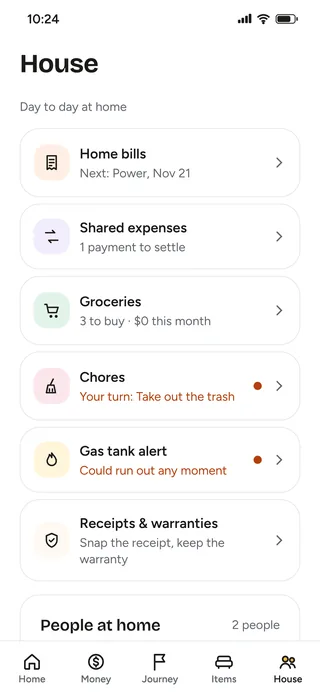
Home tab after move-in: home bills, shared expenses, groceries, chores, gas tank alert and receipts and warranties

Reminders before due dates

Rent, utilities, internet, insurance and your mortgage payment, each with its own date.

Paid? One tap.

Mark what you paid and see each month’s history.

Split bills

From couples to roommates: who paid what and who owes whom, no spreadsheet and no awkwardness.

Insurance renewing? I’ll remind you.

Yearly bills like renters insurance get a reminder before they renew, so nothing catches you off guard.

Chores without the drama

Trash, dishes, bathroom: Chavinho rotates the chores (or everyone picks) and shows whether things are balanced. He does the nagging, not your roommate.

Out of coffee? It goes on the list.

One tap, or a photo of the pantry, and it’s on the grocery list, the same one on everyone’s phone at home. And you see what you spend on groceries each month.

Snap the receipt

Snap the receipt: Chavinho reads the store, the items and the prices, you check them, and the warranty gets a reminder 30 days before it ends.

Founder pricing for the first 500.

Building your plan is free. Join the list and confirm your email to pay less in your first year.

Founder pricing · 58% off

Annual

$5.83 $4.17per month

Billed $49.99 upfront for the first year, for the first 500 who confirm their email. Then $69.99 a year ($5.83 a month). 58% less than 12 months of monthly.

Monthly

$9.99per month

Billed $9.99 every month. Cancel anytime. Every plan starts with 7 free days.

One subscription, the whole home.

Everyone you live with joins by invite, each on their own phone, without paying again. Couples, roommates or family. With 4 roommates, the annual plan comes to $1.46 a month each.

  • Friends and guests pay nothing and don’t need the app
  • Works for your new home and your wedding registry
  • Privacy firstClear rules on how we use your data
  • Money goes straight to youWe add no fees. Unlockie never touches your money
  • We don’t sell dataNever sold or shared

Questions

How does founder pricing work?

The first 500 people who join the list and confirm their email pay $49.99 for the first year of the annual plan, instead of $69.99. After the first year, regular pricing applies. It’s once per person, and the discount arrives at launch, at the email you confirmed.

When does Unlockie launch?

We’re finishing the last details, for iPhone and Android. People on the waitlist get the invite first, with launch pricing.

I’m still saving for a down payment. Is it for me?

Yes. Unlockie starts at the down payment stage, with goals and how much to save each month, and stays with you until move-in.

Do I have to pay to build my plan?

No. Building your plan is free. After that, you get 7 days to try everything before paying.

Does gift money go through Unlockie?

No. Friends send it straight to you through Venmo, Zelle or PayPal. Unlockie just keeps track of who gave what.

Can I use it with the people I live with?

Yes. Invite them and you share the same list, goals and countdown. One subscription covers the whole home, whether it’s a couple, family or roommates.

Can I add items from any store?

Yes. Paste the product link and Unlockie pulls the name, photo and price. You always review before saving, since prices change. Friends see a "View in store" button.

Do gift givers show up for everyone?

Only if they want. Whoever reserves a gift chooses whether to show their name, and other guests can’t see who gave what.

Can friends and family help with the down payment?

They can, if you want. Turn on a group fund for a goal (down payment, moving, honeymoon) and share the link. Anyone can send money straight to you: Unlockie never touches it. You choose whether the total shows.

Does it work for roommates?

Yes. Each roommate joins on their own phone, and you split bills, the grocery list and household purchases, seeing who owes whom. One subscription covers everyone at home.

Does it work as a wedding registry?

Yes. Put your wedding date and move-in date in one plan, with goals for the wedding, honeymoon and home together. One registry, with home essentials and honeymoon shares.

Where do the simulator’s prices and bills come from?

They’re rough averages from big US retailers and typical bills by home size, in 2026. They’re for planning, not a quote. In the app you swap in your own numbers.

Does Unlockie recommend mortgages?

No. Unlockie helps you organize the path. For mortgage estimates, talk to a licensed lender.

Hi, I’m Pedro.

I’m a developer from Brazil building Unlockie in public, one piece at a time. If you’re saving for a down payment, waiting on the keys or setting up a home, I want to hear from you: reply to any Unlockie email, I read them myself.

You’re putting money toward the down payment this month, right?

…right?

Join the list and get to move-in day with everything ready.

You’ll get an email to confirm. The first 500 who confirm pay $49.99 for their first year. No spam.